
Anyone who has tried to get a record onto Spotify without following the album cover specs knows how unsettling it can be: a file refused by the distributor, a blurry image on the home screen, a crop that slices through the album title. Before getting to the numbers, it helps to read a complete guide to designing an album cover. A file's dimensions are only a container. What counts is what you put in it.
Spotify's official album cover size in 2026
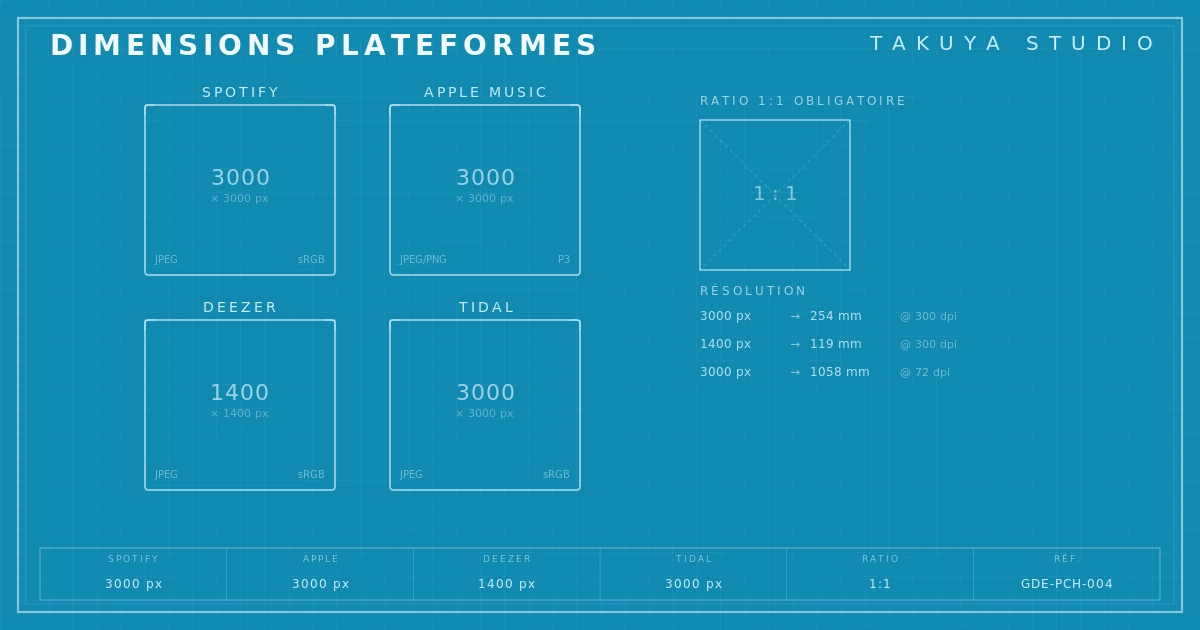
As of April 2026, the requirements published by Spotify for Artists haven't changed in substance since 2023, but they have tightened. The recommended size is 3000 × 3000 pixels, strictly square (1:1). The minimum accepted is also 3000 × 3000: Spotify no longer lets through the 1600-pixel files that passed a few years ago. Accepted formats are JPEG and PNG, up to 20 MB. The color space must be sRGB. CMYK or Adobe RGB files are rejected, or converted automatically with unpredictable results.
These numbers look trivial, and you'd think any image editor could sort them out in ten seconds. Yet independent musicians' forums are full of releases held up for days, sometimes weeks, because a distributor turned the image down. The cause is rarely the resolution. It's the color profile.
How the specs changed, from vinyl to pixel
In the 1970s, an LP sleeve gave the designer 31.5 × 31.5 cm, generous room for typographic detail, texture and material. The CD, in the 1980s, cut that surface to 12 × 12 cm. A painful loss, but the object was still physical and printed.
With streaming, the cover became a file shown on every kind of screen, from a 32-inch 4K monitor to a 6-inch phone on the subway. The 3000-pixel square has to work at all those scales at once. On Spotify, the cover often shows up at 64 × 64 pixels in the queue, at 300 pixels in album view, and at full resolution only on the largest screens. Designing for that elasticity is a design problem in its own right, and most artists working without a designer underestimate it.
Why distributors reject your file
Distributors such as DistroKid, TuneCore and CD Baby run automated checks before sending anything to the platforms. They look at three things: minimum resolution, aspect ratio and the embedded ICC profile. The last one causes the most silent rejections.
A designer working in Photoshop or Affinity Photo will often use Adobe RGB (1998) for its wider gamut, a sound habit for print. Streaming platforms don't read Adobe RGB. They expect sRGB. When the file isn't converted, colors shift. Reds go dull, greens lose saturation, subtle shades disappear. Sometimes the file passes validation but no longer looks like the original. That's the worst case, because nothing shows until the release is live.
The second trap is the CMYK file. Some designers hand over four-color files prepared for offset with no RGB version. Distributors reject them, and when they don't, the automatic conversion is a disaster: blacks turn brown and whites go yellow.

Exporting properly: a five-step protocol
Better to follow a strict protocol than to count on the leniency of automated checks. First, work in sRGB from the start if the cover is meant for digital release. Second, export at 3000 × 3000 pixels, no exceptions; even if the source file is larger, resizing should be a deliberate, controlled step. Third, embed the sRGB ICC profile ("Embed Color Profile" in Photoshop, "ICC Profile Embedding" in Affinity). Fourth, set JPEG quality between 90 and 100 to keep detail while staying under the 20 MB limit. Fifth, check the result on a calibrated screen and on a smartphone, and make sure both look right.
That may sound like a lot for an image file. But when the cover is the first visual contact with a record, neglecting the technical chain means accepting that the final image won't be the one you designed. And that image, compressed, resized, shown at 64 pixels on a phone, is what decides whether a curious listener taps or scrolls on.
Multi-format export: thinking beyond Spotify
Apple Music also asks for 3000 × 3000 pixels in sRGB, and it accepts uncompressed PNG, the better choice for covers with fine text or flat color. Deezer, Amazon Music, Tidal and YouTube Music each have minor quirks, but they converge. The good habit is a master file in uncompressed PNG, 3000 × 3000, sRGB, from which every other version is derived.
For a vinyl or CD pressing, keep a separate high-resolution source, ideally TIFF or PSD, at 300 dpi minimum and in CMYK for print. The International Color Consortium documents the standard ICC profiles. Mixing up print and digital files is the most frequent mistake among self-released artists, and the one that wastes the most time.
The Spotify album cover size is less trivial than it looks. Behind the 3000 pixels sits a chain of decisions (color space, compression, ICC profile, resizing), and each one can change the result. Getting them right means the listener sees the image you meant them to see. When attention is won or lost in a fraction of a second, that precision is not a luxury.