
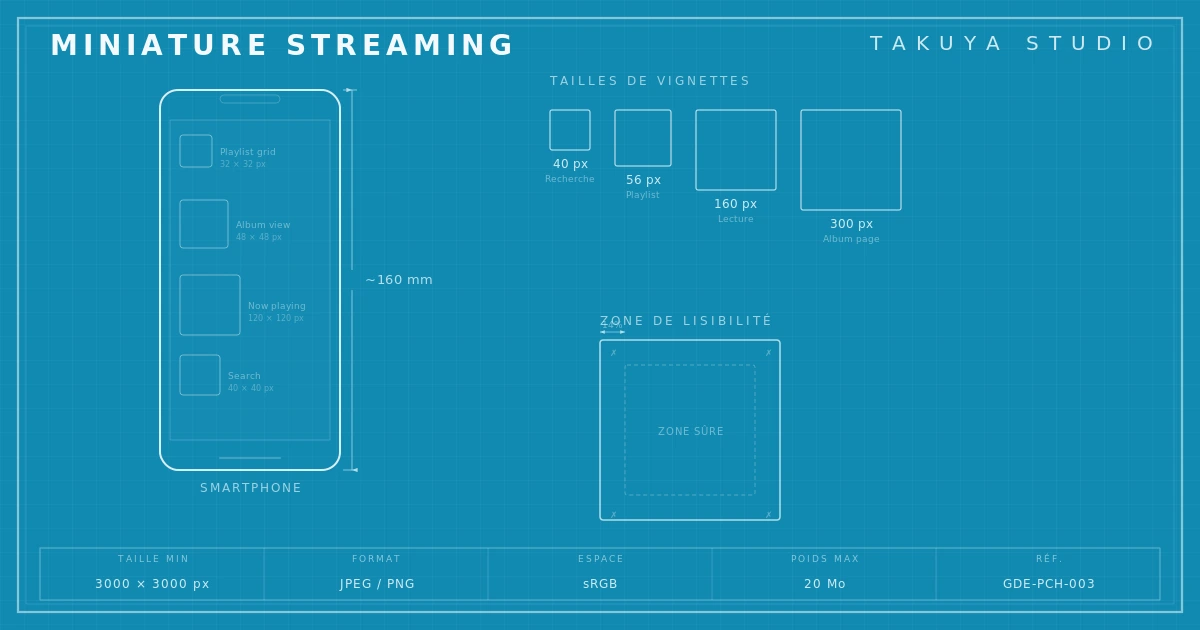
An album cover thumbnail is not a shrunken version of the cover. It's a design constraint in its own right. The diagram above puts numbers on what the eye already senses: how much of a thumbnail actually reads on a phone, depending on the platform and the screen size.
Fifty pixels to make a case
On Spotify, Apple Music or Deezer, an album thumbnail takes up somewhere between 40 and 56 pixels on a phone screen. At that size, detail disappears, textures melt together and thin type turns into unreadable strokes. Something that looked rich and layered on a 3000 × 3000 pixel design canvas comes down to a smudge. The guide to a well-made record sleeve can't ignore this anymore: an image designed for vinyl or high-definition print also has to work at the size of a digital postage stamp.
This isn't a side issue. For most listeners, the streaming thumbnail is the first visual contact with an album, sometimes the only one. In algorithmic playlists, in notifications, in search result grids, dozens of covers sit side by side at reduced size. The one that catches the eye isn't necessarily the most beautiful one at full size. It's the one designed to read at every scale. Designing for streaming is a discipline of its own, and it goes a long way toward deciding whether an artist gets noticed on the platforms.
Streaming formats and the specs to plan for from the start
Each platform has its own specifications, with one thing in common: a square, high-resolution image meant to be displayed at wildly different sizes. Spotify recommends an image of at least 3000 × 3000 pixels in JPEG or PNG, which keeps it clean on large screens with no compression loss. Apple Music accepts up to 6000 × 6000 pixels. Don't be fooled by those numbers. A 3000 pixel image full of fine detail is still illegible at 50 pixels.
The approach to adopt is multi-scale design. Work large first, for print quality, then check the reduced version every time at 56, 100 and 300 pixels. Those three sizes match, respectively, a mobile playlist thumbnail, a search result thumbnail, and display on a tablet or a small desktop window. If the cover fails at any of the three, the design isn't finished. The same multi-scale logic applies to the video formats that go with music on streaming, where Spotify Canvas and vertical 9:16 clips face the same small-size legibility limits.
Contrast, the first tool for small-size legibility
Contrast is the property that survives reduction best. Where textures, subtle gradients and fine detail vanish, a clear opposition between light and dark masses holds. A cover built on close tones (dark gray background, mid-gray elements) can look sophisticated at full size and turn into a flat, unreadable patch at 50 pixels.
The practical rule is simple. At every stage of the design, look at the cover in grayscale and at small size. If the light and dark areas don't form a readable composition under both conditions at once, there isn't enough contrast. The covers that work best as thumbnails often commit to hard oppositions, a dark ground with one dominant light element or the reverse, even if that directness feels a little blunt at full size.

One focal point, no exceptions
A cover that works at every scale nearly always rests on a single focal point, one central element that holds the attention. The principle is familiar from photography and poster design. On social media and streaming it becomes a strict constraint: the smaller the display area, the less information the eye can process at once.
A composition that piles up elements of equal weight (several figures, several text areas, several competing blocks of color) produces an image that needs time and space to be read. At 50 pixels there is no time. An eye scrolling through a playlist only stops on what imposes itself immediately. So the question to ask in front of a sketch is this: if the image had to be reduced to one element, which one would dominate? If you're not sure, the composition needs simplifying.
The focal point rule doesn't mean a poor or stripped-down cover. It can carry plenty of secondary detail to enjoy at full size, as long as one main element structures the reading at any scale. The best covers work on several levels. You recognize them instantly as a thumbnail and discover them in detail when they're large.
Typography, or when the font disappears
Logo and type legibility at small sizes follows different rules from print or editorial design. Thin weights, tight serifs, very narrow condensed faces, aggressive negative tracking: all perfectly readable and elegant at 300 points, and all indistinct strokes at 10 points.
For text on a cover meant for streaming, use weights heavy enough to survive reduction. Semi-bold at the very least, bold by preference for the artist name and the title. Sans serifs in strong weights hold up better than fine serifs. Condensed bold faces, a staple of rock and metal covers, hit hard at full size and keep a readable silhouette at small size, provided the letters stay distinct from one another.
Where the text sits on the image matters just as much. An artist name placed on a high-contrast area, light on dark or the reverse, will survive the reduction. The same name on a busy texture or a mid-contrast area will vanish. Apple Music enforces strict rules on text legibility so that covers display consistently across its interfaces.

Test before you deliver: simulating the thumbnail
Checking the thumbnail before delivery is not optional. It takes two minutes and saves a lot of disappointment on release day. The method: shrink the image to 56 × 56 pixels in Photoshop or any other software, view it at actual size with no zoom, and judge what you can read.
Three questions are enough to pass or fail it. Can you spot the focal point straight away? Does the overall contrast let you tell the main areas of the image apart? Is the text, if there is any, legible, or at least recognizable as text? A no to any one of them means the design needs adjusting. Repeat the test at 100 × 100 pixels (search results) and at 300 × 300 pixels (list view on a computer).
It also helps to test in a real context. Drop the thumbnail into a grid of similar covers, the way they show up in a playlist. In that direct visual competition, weaknesses at small size show up at once, and you see precisely how much impact the cover really has.
What this changes in the design process
Taking the thumbnail into account doesn't make the cover poorer. It forces bolder choices at every level. A stronger typographic stance. A more contrasted palette. A composition with a clear hierarchy instead of every element weighing the same. These choices, imposed by technical limits, often produce covers that are easier to identify, and so easier to remember, than more ambitious but less legible compositions.
Social media adds its own layer on top of streaming. On Instagram, the cover can appear as a square in the feed, as a cropped vertical story, as a link preview. On TikTok, it sits in a corner of the screen while a clip plays. On YouTube Music, it fills the background of the mobile player. Different contexts, one shared demand: legibility at small size, in environments crowded with competing information.
A designer who understands these limits doesn't suffer the shrinking. They plan for it from the first sketches, knowing the cover will be seen as a thumbnail far more often than full size. Only then does designing for streaming stop being a technical chore and become a way to be seen where music is discovered now.
Takuya Studio designs album covers built for every format, from vinyl to the streaming thumbnail, in Paris, since the studio was founded in 2016.