
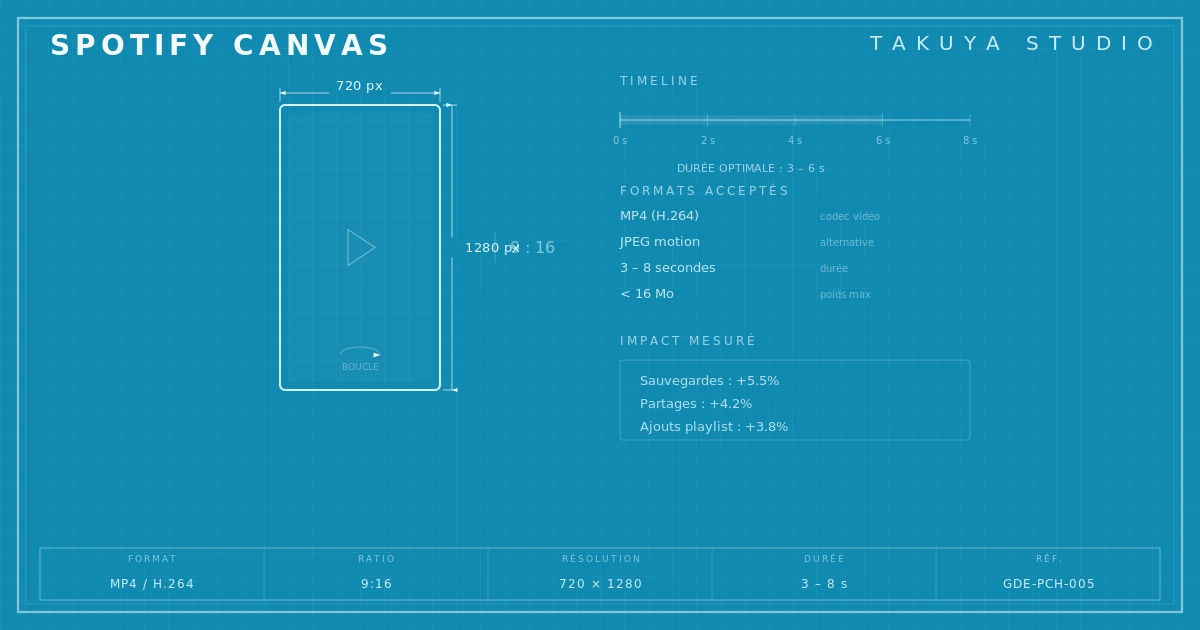
A Spotify Canvas carries on from the album cover: same graphic world, same palette, same intent. The diagram above sums up the technical constraints (format, duration, codec) that decide what's feasible before any artistic choice is made.
What a Spotify Canvas is, and what it isn't
Anyone who has studied how a finished record cover is designed knows the still image remains the foundation of a track's visual identity. The Canvas extends it without replacing it. Launched in 2019, it's a vertical video loop of three to eight seconds that plays behind the mobile player. It isn't a music video, nor a promo animation. It sits somewhere between an animated wallpaper and a tiny video installation, built to loop with no visible cut.
A good Canvas isn't a visual summary of the track. It's an atmosphere in motion that keeps the listener company without getting in the way. Treat it as a short video and you get it wrong. Treat it as an extension of the cover and the results hold together far better.
Spotify Canvas specs: the constraints of the frame
The format is 1080 × 1920 pixels, portrait, 9:16. Accepted files are MP4 for video and JPEG for still images, though a static Canvas is of questionable use. Maximum file size is 10 MB. Duration runs from three to eight seconds, and the loop has to be imperceptible: the last frame must flow into the first.
The vertical format matches the phone, the main listening device. The size limit keeps loading fast on mobile. The short duration forces economy, and that's where the design work begins. As the Spotify for Artists documentation points out, a Canvas should stay restrained and never pull attention away from the music.
Artistic approaches: show less, suggest more
The first temptation is to fill the frame with camera moves, particles and showy transitions. The result is usually busy, and tiring after two plays. The Canvases that work best are the most restrained. A texture breathing slowly. A detail of the cover that barely sways. Light shifting on a surface. The aim isn't to grab the eye but to keep it company.
Three approaches work well. The first animates one element of the cover: moving grain, a pulsing color, type that trembles slightly. The link with the cover is immediate. The second uses an almost photographic still shot with residual motion, such as smoke, water or fabric in the wind, so the eye senses movement without quite naming it. The third goes abstract, with slowly turning geometric shapes, color gradients in transit and generative textures, a register that suits electronic and ambient music.
In every case, the loop has to be invisible. If you can see the seam, the illusion falls apart. Working the transition from the last frame back to the first is often half the production work.

Impact on streaming metrics
Spotify has published figures. Tracks with a Canvas get on average 5% more streams, 145% more shares and 20% more playlist adds. These numbers need some nuance: a Canvas doesn't create an audience, it amplifies behavior that already exists. It works as a social catalyst, not as a way to win new listeners.
The most measurable effect is on the save rate, when a listener adds the track to their library. Saves matter a great deal to the recommendation algorithm, which reads them as a strong engagement signal. A good Canvas makes it more likely that passive listening turns into a deliberate action, and that improves placement in algorithmic playlists. The loop between Canvas and reach is real, provided the Canvas lives up to the music.
Canvas and cover: two sides of the same object
The question art directors face now is consistency between cover and Canvas. Both appear on the same screen a few seconds apart, first in the library, then in the player. If their visual languages drift apart, the identity cracks. The cover makes a promise, and the Canvas has to keep it.
That's why the Canvas is designed alongside the cover, not after it. The elements, the palette and the textures have to translate into motion. A good habit is to design the cover knowing that one or two of its elements will carry the animation. Whatever doesn't move well shouldn't be forced to. The studio sets out the technical constraints for each platform for the Canvas and the other streaming video formats.
The Canvas also exposes the quality of the graphic work. A cover built on surface effects (filters, decorative overlays, fashionable type) animates badly, because there's nothing underneath. A cover built on a strong visual idea, whether composition, texture or a recognizable gesture, extends into motion with ease. It's an accidental test, and a reliable one: if a cover doesn't hold up in motion, it may not have held up that well standing still. It's Nice That regularly publishes examples of this consistency between still and moving image, well beyond music.
Making a Canvas: tools and method
A Canvas doesn't call for After Effects or a post-production budget. It calls for a clear intent and controlled execution. For texture work or residual motion, DaVinci Resolve, which is free, or Canva for the simplest cases. For generative work, TouchDesigner or Processing give full control over the loop and the seam.
The most frequent production mistake is neglecting the final encode. Over-compress and artifacts appear in gradients and fine textures. Go too heavy and the file is refused. The balance sits around H.264 at 8 to 12 Mbps, which keeps a five-second loop under 10 MB with good quality on Retina screens.
The Canvas is less a revolution than a logical step. The image of a record went from a 30 cm card sleeve to a plastic case, from the case to a digital thumbnail, and from the thumbnail to a video loop. Each time, the question was the same: how do you make visible what you hear? The Canvas doesn't answer it better than vinyl did. It answers it differently.
Takuya Studio designs album covers for independent artists and labels, on the principle that the image of a record deserves the same care as the music it goes with.