
Designing a cover for a 12-inch LP is not a digital style exercise. It's print work, bound by physical constraints no screen will ever show you. Anyone who has looked into the steps behind a good record sleeve knows this already: the printed result is only as good as the source file, and a sloppy vinyl LP cover template doesn't forgive. Cardboard doesn't zoom.
Exact dimensions of a vinyl LP cover
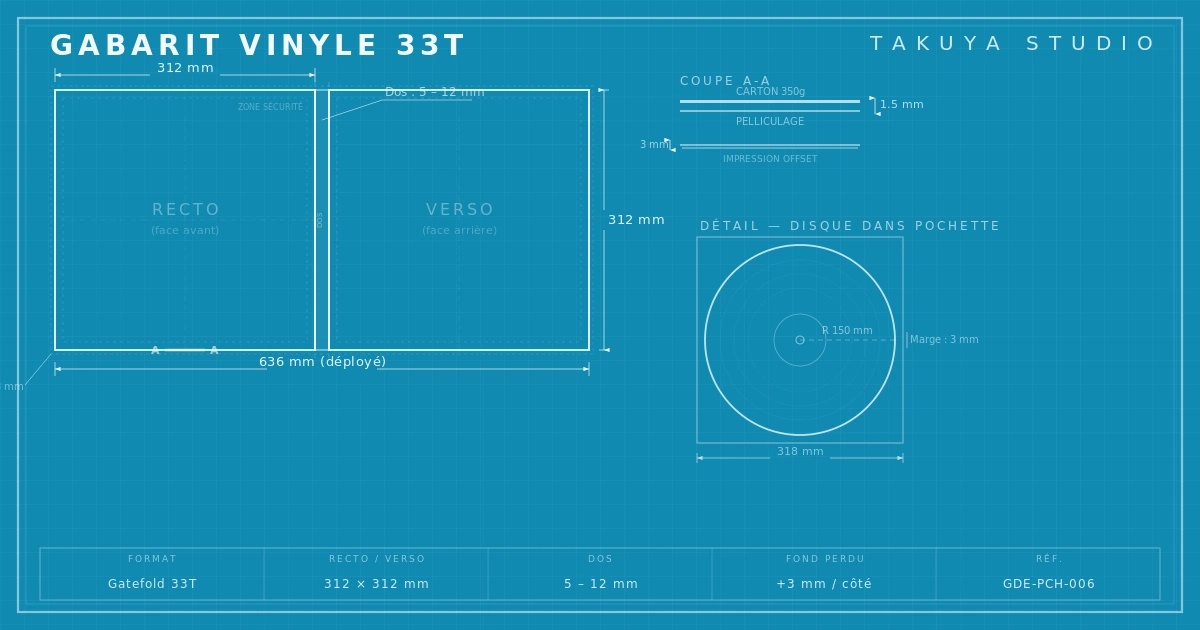
The trim size of a 12-inch LP sleeve is 312 × 312 mm. That's the visible surface once the jacket is assembled, but no printer works at trim size. The file needs 3 mm of bleed on every side, which brings the document to 315 × 315 mm for the front alone. The bleed absorbs small variations when the sheet is cut. Without it, a thin white line shows up at the edge of the sleeve. It's the most common mistake, and the most visible.
Inside the printable area you also need a safe area of at least 5 mm from the trim edge. Text, logo, barcode: anything critical stays inside that margin. This isn't an aesthetic preference, it's a technical necessity. Cutting machines work to a tolerance of ±1.5 mm, sometimes more depending on the plant. Text placed 2 mm from the edge will get clipped one time in three.
The spine, the most neglected part of the template
The spine, that narrow strip you see when the record sits in a crate, is the first area designers forget or mishandle. Its width ranges from 3 to 7 mm depending on board thickness and the number of discs inside. A single LP on 300 gsm board gives a 3 to 4 mm spine. A pressing on heavier board (350 gsm), or a double LP in a single jacket, reaches 5 to 7 mm. Ask the pressing plant for this measurement before you finalize the file.
You can put text on a 3 mm spine. You shouldn't. Under 5 mm, legibility becomes a coin toss. Fold marks belong on the template to show where the board will be folded. Without them, lining up front, spine and back depends on the operator's interpretation. In other words, on chance.
The four zones of a complete template
A single-LP sleeve template has four distinct zones, laid out flat on the same file:
The front cover carries the main artwork, the artist name and the album title; it's what people see first, in a crate, on a shelf, in a photo. The back cover holds the tracklist, credits, barcode and legal mentions. The spine takes the artist name, the title and sometimes the label logo. The inner sleeve is a separate piece, often printed on thin paper, in a standard 305 × 305 mm format, slightly smaller than the outer jacket so the record slides in without rubbing.

Gatefold sleeves, the fold-out format
A gatefold sleeve doubles the available surface. The flat file then measures about 627 × 315 mm including bleed (two 312 mm panels and a central spine). The format gives you a lot of freedom, whether a continuous panorama, two independent compositions or a mix of both. It also adds a constraint: the fold. The artwork has to account for the center fold, which is visible and wears in slightly with use. Putting a face or a line of text across the fold is rarely a good idea.
For gatefolds, some pressing plants ask for a slightly shorter flap (309 mm instead of 312 mm) so the inner panel doesn't stick out once closed. Here again, the plant supplies the exact template. Trusting a downloaded template without checking it with the manufacturer is playing roulette.
Print specs: CMYK, 300 dpi, PDF/X-1a
The final file is exported in CMYK (four-color process), not RGB. A screen's color space and an offset press's color space don't overlap; a bright RGB red turns into a dull CMYK red if the conversion wasn't planned from the moment the document was created. Minimum resolution is 300 dpi at actual size. Not 300 dpi on an image scaled to 50% in InDesign, but 300 dpi at 100% print size. The difference shows the moment the proof comes back.
The export format nearly every pressing plant asks for is PDF/X-1a. The standard guarantees that fonts are embedded, images are CMYK, transparencies are flattened and the file has no external dependencies. It's a closed, predictable format that leaves little room for interpretation by the RIP (Raster Image Processor). For black text, use pure black (C0 M0 Y0 K100), not rich black, except on large areas where a rich black (C40 M30 Y30 K100, for example) prints denser.
Classic mistakes from designers used to screens
Moving from screen to print is still a trap for designers trained on monitors. First mistake: working in RGB until the last minute, then converting on export. Colors shift, contrast sags, saturated tones turn to mud. Convert at the start of the project, not the end. Second mistake: ignoring bleed. When you only design for screens, the idea of a trim zone doesn't exist. On a print file it's vital.
The third mistake is sneakier: using 72 dpi images pulled from the web. On screen, the difference between 72 and 300 dpi is invisible; in print, it's a disaster. Fourth mistake: type and rules that are too thin. A 0.25 pt rule or 5 pt type looks fine in a PDF on screen. On board, it vanishes or bleeds. Fifth mistake: not asking the plant for its template. Pressing plants have their own tolerances, technical margins and format requirements, and the template they supply is the only reliable reference. As Disc Makers points out in its technical resources, a file that matches the manufacturer's template removes most production problems.
Vinyl is a physical object. Its template is a technical frame, not a suggestion. Respect it and you get sharp, aligned, precisely printed sleeves. Ignore it and you get proofs sent back, production delays and aesthetic compromises nobody planned for. The template isn't the enemy of creative work. It's the playing field.